
Playing on the Go With the Bruno Casino App
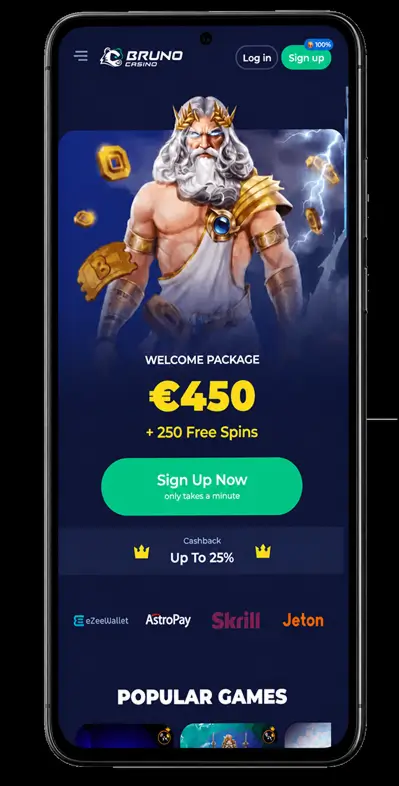
The Bruno Casino app works through your phone browser, so there is nothing to install from an app store. Open Bruno Casino online in Chrome or Safari, sign in and the full lobby is ready: slots, live tables, the sportsbook, the cashier and every promotion. A home screen shortcut makes it look and feel like a native app, with one tap access and no updates to download.
This page covers how to set up the shortcut on Android and iPhone, what to know about APK files, how the mobile version compares with desktop and what to do when a game does not load. Bonuses on mobile are the same as on desktop and are shown in US dollars.
Why Bruno Uses a Mobile Site Instead of a Download
A browser based casino has a few practical advantages over a store app. Games load from the same servers as on desktop, new titles appear on your phone the day they are added and your balance and bonuses are always in sync. Because nothing is stored on the device, the casino takes up almost no space.
| Feature | Mobile site with shortcut | Typical store app |
|---|---|---|
| Installation | Not needed, add to home screen | Download from a store or APK |
| Storage used | Less than 1 MB | 100 MB or more |
| Updates | Automatic, nothing to do | Manual or store updates |
| Game library | Full catalogue | Often limited by store rules |
| Bonuses and cashier | Same as desktop | Same as desktop |
The only things you need are a recent version of iOS or Android, a modern browser and a stable connection. Live dealer tables work best on Wi-Fi or a strong 4G or 5G signal.
A Note on APK Files
There is no official APK for the casino. Files offered as a Bruno Casino APK on third party sites are not published by the operator and can contain malware or steal login details. If a page asks you to allow installation from unknown sources, close it and use the browser shortcut instead.
Adding the Casino to an Android Home Screen
Android users get an app style icon in under a minute. The steps below use Chrome, which handles the shortcut best, but Samsung Internet and Firefox offer the same option in their menus.
- Open the casino site in Chrome on your Android phone.
- Tap the three dots in the top right corner of the browser.
- Choose Add to Home screen or Install app.
- Confirm the name and tap Add.
- Open the new icon and complete the Bruno Casino login once.
From then on the icon opens the casino in full screen without the browser bar, just like an app for Android downloaded from a store. Notifications can be turned on from the browser settings if you want to hear about new offers.
 Bruno Casino | Mobile Welcome Offer | 100% up to $500 + 150 Free Spins | Play Now |
Setting Up the Shortcut on iPhone and iPad
There is no Bruno Casino iOS app in the App Store, but Safari creates the same kind of shortcut. It works on iPhone and iPad with iOS 15 or newer.
- Open the casino site in Safari.
- Tap the Share button, the square with an arrow at the bottom of the screen.
- Scroll down and tap Add to Home Screen.
- Rename the icon if you like and tap Add.
The icon opens the casino in its own window. Face ID can fill in your saved password through the iCloud keychain, so signing in takes a second.
Mobile Requirements at a Glance
Most phones from the last five years run the site without problems.
| Device | Minimum version | Recommended browser |
|---|---|---|
| Android phones and tablets | Android 9 | Chrome |
| iPhone | iOS 15 | Safari |
| iPad | iPadOS 15 | Safari |
What You Can Do in the Mobile Casino
Everything available on desktop is also on the phone. The menu is moved to a bottom bar and the game tiles are resized for touch screens, but no features are removed.
- Slots: thousands of games in portrait or landscape mode.
- Live casino: roulette, blackjack, baccarat and game shows streamed in HD.
- Sportsbook: pre-match and live betting from the same balance.
- Cashier: deposits from $15 and every Bruno Casino withdrawal request.
- Promotions: the welcome offer, reloads, cashback, tournaments and any Bruno Casino no deposit bonus running at the time.
The full Bruno Casino bonus range works the same way on the phone, including activation and wagering progress in the profile. Here are some of the slots that play well on smaller screens.




Data Use and Battery on the Mobile Casino
Slots and live games use very different amounts of data. If you play on mobile data, it helps to know roughly what each session costs, especially when roaming or on a limited plan.
| Activity | Approximate data per hour | Battery impact |
|---|---|---|
| Video slots | 20 to 60 MB | Low |
| Table games (RNG) | 10 to 30 MB | Low |
| Live dealer games in HD | 300 to 600 MB | High |
| Live betting with match tracker | 30 to 80 MB | Medium |
Lowering the stream quality in the live game settings cuts data use by about half. Turning down screen brightness and closing background apps keeps the battery going for longer sessions. A Bruno Casino download is never needed for any of these games, so the only storage used is the browser cache, which you can clear at any time.
Fixing Common Mobile Problems
If the mobile casino behaves strangely, the cause is usually the browser rather than the site. Try these steps in order.
- Close other tabs and apps to free memory.
- Clear the browser cache and cookies for the casino site.
- Update the browser and the operating system.
- Switch from mobile data to Wi-Fi for live games.
- Remove the home screen icon and add it again.
If a game still freezes, note its name and the time and send them to live chat. The Bruno Casino app experience is built to match desktop, so any difference you notice is worth reporting.